Self-Hosting n8n in Production: A Real-World Setup Guide (nginx, PM2, Node, and the Bugs Nobody Warns You About)
A step-by-step, battle-tested guide to self-hosting n8n on your own server with nginx, PM2, and the correct Node version, plus fixes for the localhost webhook URL bug, npm install stalls, and password resets without SMTP.
n8n is one of the best open-source workflow automation tools out there, a genuine self-hostable alternative to Zapier and Make. But there is a gap between it runs on my laptop and it runs reliably on my own server behind a real domain with HTTPS. Most tutorials stop at npx n8n and wave their hands at the rest. This guide walks through a production self-hosting setup end to end, the same kind of cloud infrastructure work we do for clients, and, more importantly, the handful of non-obvious bugs that cost us hours.
This is the guide I wish I had. If you are deploying n8n on a VPS without Docker, or you just want to understand what Docker would have hidden from you, this post is for you. Every step is explained, every configuration file is shown in full, and every trap we hit is documented with the exact fix.
Why self-host n8n at all?
Three reasons drove the decision on the project this write-up is based on. Each one is a valid answer on its own, and together they made the case obvious.
Data ownership: The workflows touch internal systems. We did not want that traffic flowing through a third-party cloud where every payload is one bug away from being logged, sampled, or subpoenaed.
Cost at scale: Hosted automation pricing is per-execution or per-step. Once you run tens of thousands of executions a month, a small VPS is dramatically cheaper. The break-even point arrives faster than most teams expect.
Flexibility: Self-hosting lets you install community nodes, pin exact versions, control the runtime, and add custom middleware. Nothing is off-limits.
The tradeoff is that you are now the ops team. That is the whole point of this article, to make that job boring and predictable.
The architecture at a glance
Here is the mental model before we touch a terminal. Nothing exotic, just the standard reverse-proxy pattern with a process manager keeping the app alive.
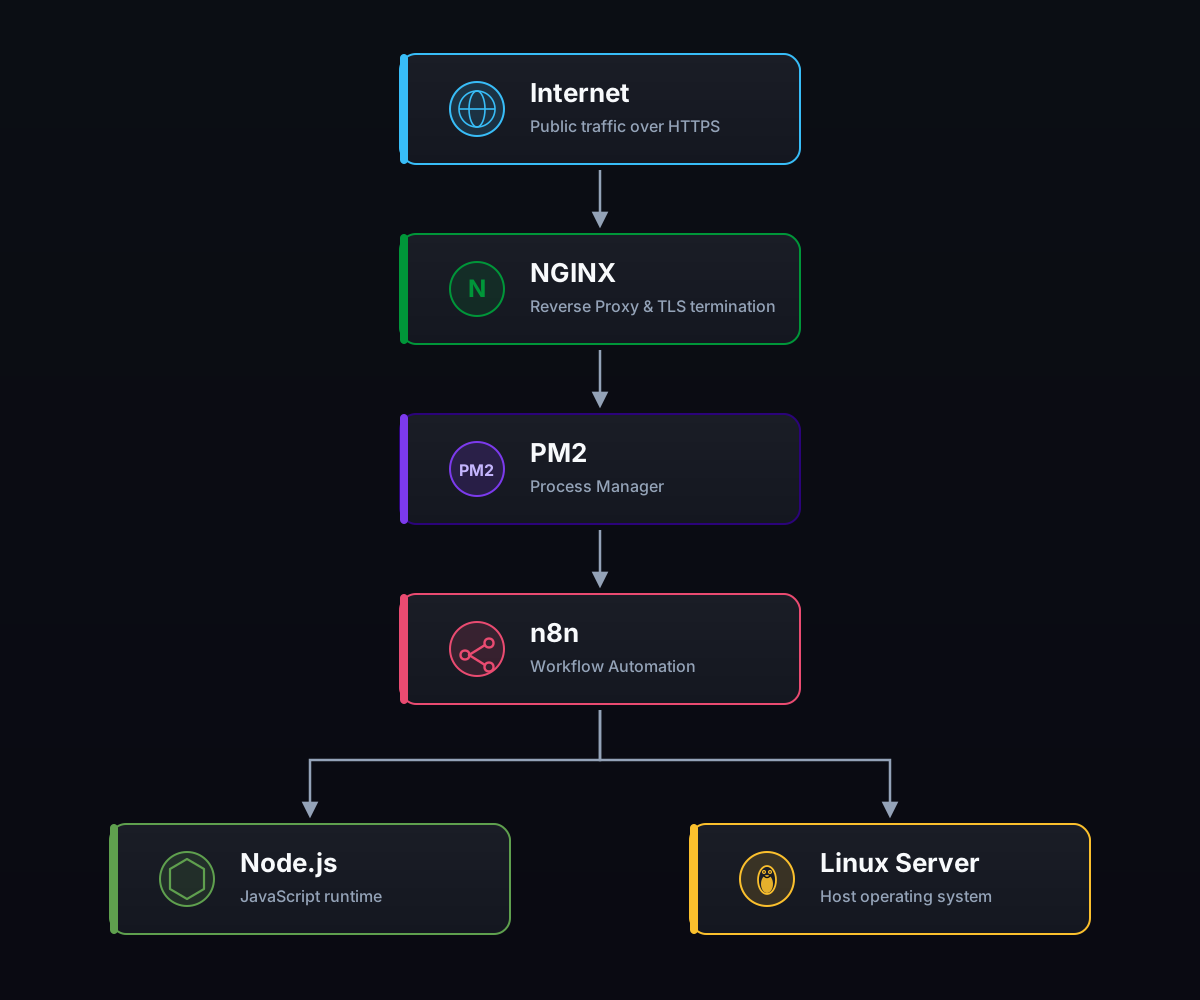
Three decisions are baked into this diagram, and each one matters:
nginx does TLS, n8n speaks plain HTTP on localhost: n8n never holds a certificate. This is the standard, robust reverse-proxy pattern used everywhere in production Node deployments.
n8n binds to 127.0.0.1:5678, not 0.0.0.0: The only way in from the internet is through nginx. This means firewall rules, rate limiting, and TLS all live in one place instead of being duplicated at the application layer.
PM2 keeps n8n alive: It restarts on crash, restarts on reboot, and centralizes logs. If the app dies at 3am, it is back before you notice.
Step 1: Get the right Node.js version
This is the very first place people get burned. n8n 2.x requires Node.js 22 or newer. Many stable Linux distros still ship Node 18 or 20, and n8n will either refuse to start or crash in confusing ways.
The cleanest fix is nvm (Node Version Manager), which lets you install a modern Node without touching the system Node your OS depends on for its own tools.
# Install nvm
curl -o- https://raw.githubusercontent.com/nvm-sh/nvm/v0.39.7/install.sh | bash

# Reload your shell, then install and use Node 22
nvm install 22
nvm use 22

node -v   # should print v22.x
Pro tip that saved us later: note the full path to this Node binary. With nvm it looks like the second line below.
which node
# /home/youruser/.nvm/versions/node/v22.x.x/bin/node
We will need that exact path in Step 3, because background process managers do not always inherit your interactive shell's nvm setup. Losing 20 minutes to a wrong Node version is a rite of passage; you can skip it by writing the path down now.
Step 2: Install n8n as a project (not globally)
You can npm install -g n8n, but for production I strongly prefer a local project install. It pins the version, keeps a package.json you can commit, and lets you use npm overrides (which we will need later in the battle scars section).
mkdir ~/my-n8n && cd ~/my-n8n
npm init -y
Edit package.json to pin the exact version you tested. Unpinned installs can silently jump a minor version and change behavior between deploys, which is exactly the kind of drift that turns a Tuesday afternoon into an incident.
{
  "name": "my-n8n",
  "private": true,
  "dependencies": {
    "n8n": "2.28.5"
  }
}
Then install:
npm installPinning the version matters more than it sounds. n8n moves fast, and one afternoon of debugging a mysterious regression will convince you forever that pinning is worth the small overhead of manual bumps.
Step 3: Run it under PM2 with a launcher script
PM2 is a battle-tested Node process manager. It restarts crashed processes, survives reboots, and centralizes logs into a single place you can tail with one command.
The subtlety is this: PM2 runs as a daemon and does not load your interactive shell's nvm setup. If you just point PM2 at n8n, it may find the system Node (the wrong version) or nothing at all. The robust fix is a tiny launcher script that spawns n8n using the absolute path to the correct Node binary.
Create runner.js:
const { spawn } = require("child_process");
const path = require("path");

// n8n 2.x needs Node >= 22. The system Node may be older, so launch n8n
// with the nvm-managed Node 22 explicitly. Override with N8N_NODE_BIN if needed.
const nodeBin =
  process.env.N8N_NODE_BIN ||
  "/home/youruser/.nvm/versions/node/v22.x.x/bin/node";

// n8n CLI entrypoint inside node_modules
const n8nEntry = path.join(__dirname, "node_modules", "n8n", "bin", "n8n");

function startN8N() {
  console.log("Starting n8n with " + nodeBin + " ...");

  const n8n = spawn(nodeBin, [n8nEntry], {
    stdio: "inherit",
  });

  n8n.on("exit", (code) => {
    console.error("n8n exited with code " + code + ". Restarting...");
    setTimeout(startN8N, 3000); // auto-restart after 3s
  });
}

startN8N();
Start it under PM2 and make it survive reboots:
pm2 start runner.js --name n8n
pm2 save
pm2 startup   # follow the printed instruction to enable boot persistence
Check it is alive:
pm2 list
pm2 logs n8n
At this point n8n is listening on http://127.0.0.1:5678, but only locally. Time to expose it safely.
Step 4: Put nginx in front for HTTPS
We want https://n8n.example.com to reach n8n, with a valid certificate and WebSocket support (n8n's UI uses push connections that need it, or the editor will feel broken).
Create an nginx site config, for example at /etc/nginx/sites-available/n8n.conf:
server {
    listen 80;
    server_name n8n.example.com;

    location / {
        proxy_pass http://127.0.0.1:5678;

        proxy_http_version 1.1;
        proxy_set_header Upgrade $http_upgrade;      # WebSocket support
        proxy_set_header Connection "upgrade";
        proxy_set_header Host $host;
        proxy_set_header X-Real-IP $remote_addr;
        proxy_set_header X-Forwarded-For $proxy_add_x_forwarded_for;
        proxy_set_header X-Forwarded-Proto $scheme;  # tells n8n it is HTTPS

        proxy_buffering off;                          # smoother streaming/push
    }
}
Enable it and reload:
sudo ln -s /etc/nginx/sites-available/n8n.conf /etc/nginx/sites-enabled/
sudo nginx -t          # test config
sudo systemctl reload nginx
Now add TLS with Let's Encrypt. Certbot rewrites the config to add the 443 block and set up auto-renewal:
sudo certbot --nginx -d n8n.example.comTwo headers above are load-bearing:
Upgrade and Connection headers: Without these, the n8n editor UI shows constant connection lost errors because its push channel cannot establish. The symptom looks like a broken app; the root cause is a missing header.
X-Forwarded-Proto $scheme: Tells n8n the original request was HTTPS, even though nginx forwards it as plain HTTP internally. Without this, n8n may generate insecure URLs or refuse to set the secure session cookie.
Visit https://n8n.example.com and you should see the n8n setup screen. Almost done, except for the bug that made me write this article.
Step 5: Fix the localhost webhook URL bug
Here is the symptom that probably brought a lot of you to this page. The app loads fine, but n8n shows webhook and editor URLs as http://localhost:5678/ instead of your real domain. Copy a webhook URL to use in an external service and it is useless, it points at localhost on the wrong machine.
The cause is subtle. n8n builds those public URLs from environment variables:
N8N_PROTOCOL=https
N8N_EDITOR_BASE_URL=https://n8n.example.com/
WEBHOOK_URL=https://n8n.example.com/
N8N_PUBLIC_URL=https://n8n.example.com
N8N_SECURE_COOKIE=true
You might dutifully put these in a .env file, and still see localhost. Why?
Because n8n does not read a .env file on its own. It reads environment variables from the process it is launched in. If your PM2 launcher script (from Step 3) spawns n8n without injecting those variables, they never reach it, and n8n falls back to defaults, which means localhost:5678.
There are two ways to fix it. The clean, explicit one is to inject the variables directly in the launcher's spawn call:
const n8nEnv = {
  ...process.env,
  N8N_PROTOCOL: "https",
  N8N_EDITOR_BASE_URL: "https://n8n.example.com/",
  WEBHOOK_URL: "https://n8n.example.com/",
  N8N_PUBLIC_URL: "https://n8n.example.com",
  N8N_SECURE_COOKIE: "true",
};

const n8n = spawn(nodeBin, [n8nEntry], {
  stdio: "inherit",
  env: n8nEnv, // the fix
});
Restart and update the environment:
pm2 restart n8n --update-envRefresh the browser with a hard reload (Ctrl or Cmd + Shift + R) and your webhook URLs now show the real domain.
The trap inside the fix
When we fixed this, we were tempted to just load the entire .env file into the launcher. Do not do that blindly. Our .env also contained a line like:
N8N_USER_FOLDER=./dataN8N_USER_FOLDER controls where n8n stores its SQLite database and encryption key. Two things made this dangerous:
- 1
The variable is relative: The path ./data resolves against the current working directory of the PM2 process, which was not the project folder but the user's home directory. The database would have moved locations silently.
- 2
The app would look wiped: If we had suddenly applied it, n8n would have switched to a brand-new, empty database. Every existing workflow and credential would have disappeared. They would still be on disk in the old location, but the running app would look freshly installed.
The lesson: only inject the variables you actually intend to change. We deliberately injected the URL variables and left N8N_USER_FOLDER alone so the live database stayed exactly where it was.
How to confirm which database is actually live
On Linux you can ask the kernel which files an open process is using. This removed all guesswork for us and it should for you too.
# find the n8n process id
pgrep -f "node_modules/n8n/bin/n8n"

# see exactly which database file it has open
ls -l /proc/<PID>/fd | grep database.sqlite
# -> .../.n8n/database.sqlite
That /proc/<PID>/fd trick is worth memorizing. It is the difference between believing your config took effect and knowing it did.
Battle scars: three bugs that ate our afternoon
Beyond the localhost URL issue, three more problems are worth documenting because their error messages point you in the wrong direction. Each one wasted at least an hour on its own, and each one has a simple root cause once you know where to look.
1. The .env that lies
We already covered this, but it deserves restating as a general principle: a .env file only works if something loads it. Node does not read .env automatically, that is what libraries like dotenv are for. If your process manager launches the app directly, your carefully written .env may be pure decoration.
Always verify the running process's environment:
# dump the environment of the running process (Linux)
tr '\0' '\n' < /proc/<PID>/environ | grep WEBHOOK_URL
If your variable is not in that output, it is not in effect, no matter what the file says. Trust the kernel, not the config file.
2. npm install stalls forever on a spreadsheet library
Our install kept hanging. The culprit was a transitive dependency (a spreadsheet or xlsx library) that fetches its package from a vendor CDN instead of the npm registry. When that CDN is slow, the whole install stalls with no useful output.
The fix is npm's overrides field, pointing the dependency at a locally-vendored tarball you download once:
{
  "overrides": {
    "xlsx": "file:./vendor/xlsx-0.20.2.tgz"
  }
}# download the tarball once, commit it, and installs become instant and reproducible
mkdir -p vendor
curl -L -o vendor/xlsx-0.20.2.tgz https://registry.example/path/to/xlsx-0.20.2.tgzBeyond fixing the stall, vendoring makes your build reproducible and immune to that CDN going down. A real supply-chain resilience win with almost no ongoing cost.
3. A crash-loop with a completely misleading error
The nastiest one. After a dependency bump, n8n entered a crash-loop printing something like:
Error: Failed to load module "breaking-changes"We chased that module name for a while, and it was a red herring. The module loader was masking the real error: it tried one path, failed, fell back to another, and swallowed the underlying exception on the way.
The actual root cause was a duplicate copy of the zod validation library. A newer dependency pulled in zod v4 at the top level, which forced n8n's own zod v3 into nested copies. Certain zod features (like discriminatedUnion) break when two different zod instances interact, because the schema built by one instance is not recognized by the other.
The fix was to pin a single zod version as a direct dependency so it hoists to the top of node_modules and every package shares one instance:
{
  "dependencies": {
    "zod": "3.25.67"
  }
}
You can verify the dedup worked:
# both of these should resolve to the SAME node_modules/zod
npm ls zodWhen a Node app throws an impossible-looking module not found, suspect a duplicated dependency in node_modules before you suspect the module itself.
Bonus: resetting a password when you have no SMTP
A very common self-hosted situation: you have locked yourself out, and you never configured an SMTP server, so n8n's forgot password email flow is a dead end. There is no reset link because there is no email to send it to.
Because n8n stores users in its SQLite database with a bcrypt password hash, you can reset it directly. Do this only on a server you own, and back up first.
# 1. ALWAYS back up the database first
cp ~/.n8n/database.sqlite ~/.n8n/database.sqlite.bak

# 2. Generate a bcrypt hash for your new password using the app's own bcrypt
node -e "console.log(require('bcryptjs').hashSync('YOUR_NEW_PASSWORD', 10))"
# -> $2a$10$....................................................# 3. Update the row, then checkpoint the write-ahead log so it persists
sqlite3 ~/.n8n/database.sqlite \
"UPDATE user SET password='PASTE_HASH_HERE' WHERE email='you@example.com'; \
PRAGMA wal_checkpoint(TRUNCATE);"Two details that trip people up:
Use the app's own bcrypt: Run node -e using require('bcryptjs') from n8n's node_modules so the hash format matches exactly ($2a$10$...). Mismatched bcrypt variants silently produce a login that never accepts your password.
Run PRAGMA wal_checkpoint(TRUNCATE): SQLite in WAL mode buffers writes in a separate -wal file. Without a checkpoint, your update may not be visible where you expect it, and re-opening the file from another tool can appear to lose the change.
Verify without even opening the browser:
curl -s -o /dev/null -w "%{http_code}\n" \
  -H "Content-Type: application/json" \
  -d '{"emailOrLdapLoginId":"you@example.com","password":"YOUR_NEW_PASSWORD"}' \
  http://127.0.0.1:5678/rest/login
# 200 = success
Lessons learned
If you take four things away from this experience, make it these:
- 1
Verify the running process, not the config file: A .env, a package.json, a config file, none of them matter until you confirm the live process actually reflects them. /proc/<PID>/environ and /proc/<PID>/fd are your truth serum on Linux, and they will save you hours the first time you learn to reach for them.
- 2
Change the minimum number of variables: We nearly nuked our database by applying a whole .env when we only needed four URL variables. Surgical changes beat bulk changes, especially for anything that controls where data lives.
- 3
Error messages lie, especially module loaders: Failed to load module X was really you have two copies of a dependency. When an error makes no sense, check node_modules for duplicates before you go down a rabbit hole chasing the string in the message.
- 4
Pin and vendor for reproducibility: Pin your app version, pin the sneaky sub-dependency (zod), and vendor the package that likes to fetch from a flaky CDN. Future-you, debugging a broken deploy at 11pm, will be grateful.
Self-hosting n8n is not hard once you understand the pieces. A modern Node runtime, a process manager that actually passes the right environment, and a reverse proxy that speaks WebSockets and forwards the real protocol. The tricky part is never the happy path; it is the four or five places where a default quietly does the wrong thing. Now you know where they are.
If you need a partner to set up production infrastructure for n8n or any other self-hosted service, from the VPS through TLS, backups, and observability, that is exactly the kind of cloud infrastructure work we ship at ETechViral. For a related deep dive on shipping software through a hardened pipeline, see our Flutter CI/CD guide for GitHub Actions.
- n8n
- Self-Hosting
- DevOps
- nginx
- PM2
- Node.js
- SQLite
- Automation
- Production
Related articles
Setting Up Flutter CI/CD on GitHub Actions with Three Flavors: Every Bug We Fixed Along the Way
A real-world guide to building a Flutter CI/CD pipeline on GitHub Actions with dev, test, and prod flavors on Android and iOS. Every signing bug, Gradle hang, Xcode configuration trap, and Firebase upload issue we hit, with the exact fix for each.
22 min read
How to Secure Your WebRTC Communications with Encryption: A Detailed Guide
WebRTC powers low-latency video, voice, and data across the browser, but with rising cyber threats, encryption is no longer optional. A walk-through of DTLS, SRTP, key exchange, and practical steps to keep real-time communication safe.
4 min read