How I Built an AI-Powered ASL Sign Character with Claude Code
A real engineering breakdown of a 3D character that signs any English sentence in ASL, synthesised at runtime from the ASL-LEX 2.0 phonological database, driven by analytic IK in three.js, with no pre-recorded animation.
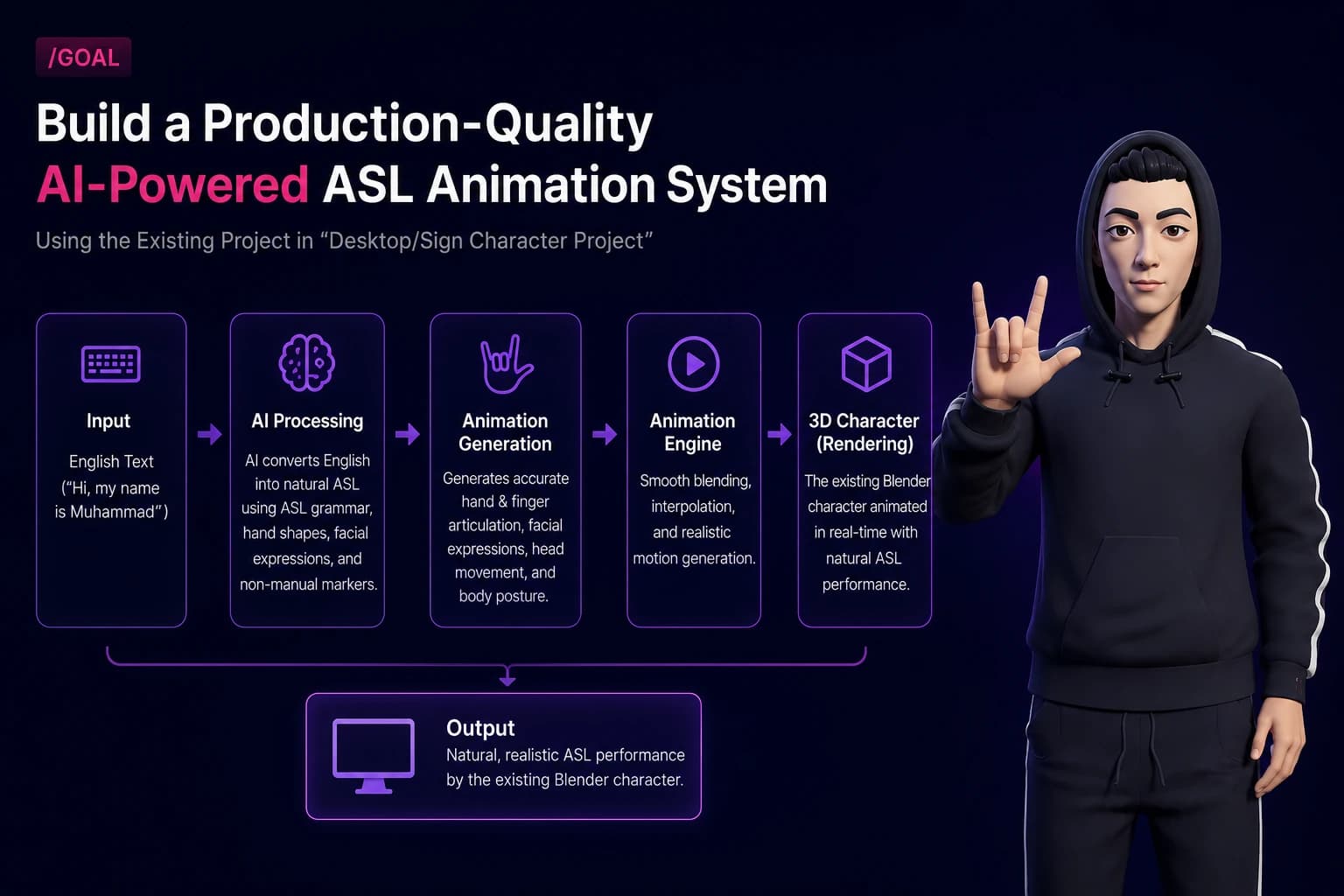
I type "Hi, my name is Muhammad" into a text box. A 3D character signs it in American Sign Language — reordered into ASL grammar, with correct handshapes, three-phalanx finger articulation, facial non-manual markers, and my name fingerspelled letter by letter.
Nothing is pre-recorded. Every frame is synthesised at runtime from a phonological database, so any sentence works, not just a fixed phrase list.
This article is the overview of how it actually got built. The rest of the series digs into each layer.
What problem is this actually solving?
Most sign language avatar demos are a lookup table. You get a fixed list of phrases, each one a hand-animated clip, and anything outside the list fails.
That approach does not scale, and it fails in a specific way: it cannot fingerspell a name it has not seen. Names are exactly what you need sign language for in an introduction.
So the constraint I set was: any English sentence in, a legible ASL performance out. That rules out clip playback and forces runtime synthesis.
Two consequences follow immediately, and they shaped everything:
- 1
I need a machine-readable description of what each sign physically is, not a video but a set of parameters.
- 2
I need an animation system that can turn those parameters into joint rotations on a real rig, without a human animator in the loop.
The starting point: a character that already existed
This is worth stating clearly because it inverts the usual tutorial setup.
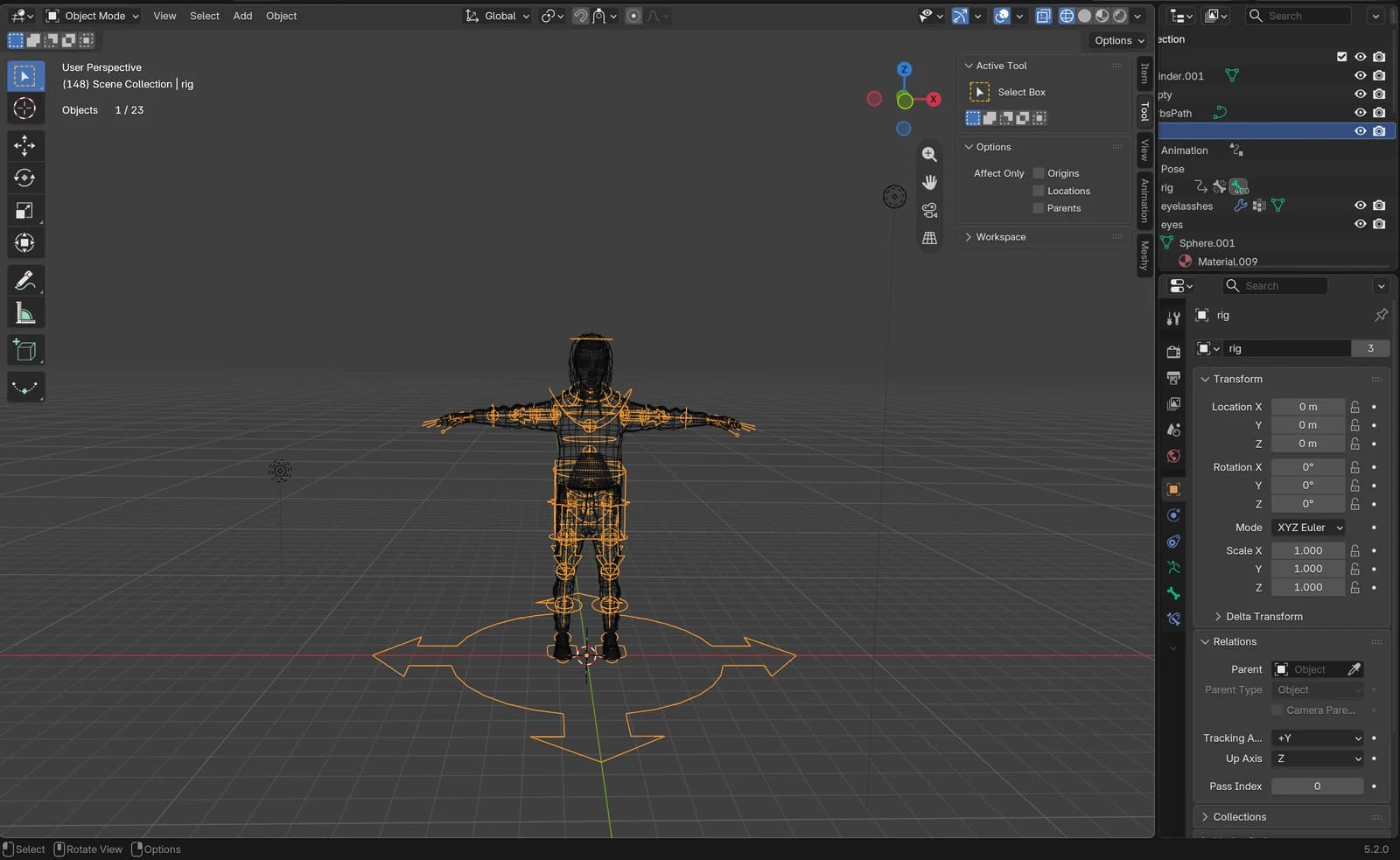
The character, my sign character.blend, comes from BlendSwap (blend/30691) and was already modelled and rigged before any of this work started. It is a Rigify rig with the following properties:
400 bones, 71 of them deform bones.
Complete three-phalanx chains on all ten fingers.
Clean skin weights, zero unweighted vertices.
A fully sculpted face with real eye and mouth.
The rule I gave myself, and gave Claude, was: do not recreate or replace the character. Inspect it first, build around what is there.
That constraint is not sentimentality. Regenerating a character is the easy escape hatch when the rig does not do what you want, and taking that escape hatch means you never learn what the rig actually does. Every problem in this project was easier to solve once I had measured the real rig instead of assuming.
Two things were missing:
Architecture overview
Here is the whole pipeline. Read it top to bottom; each arrow is a real file.
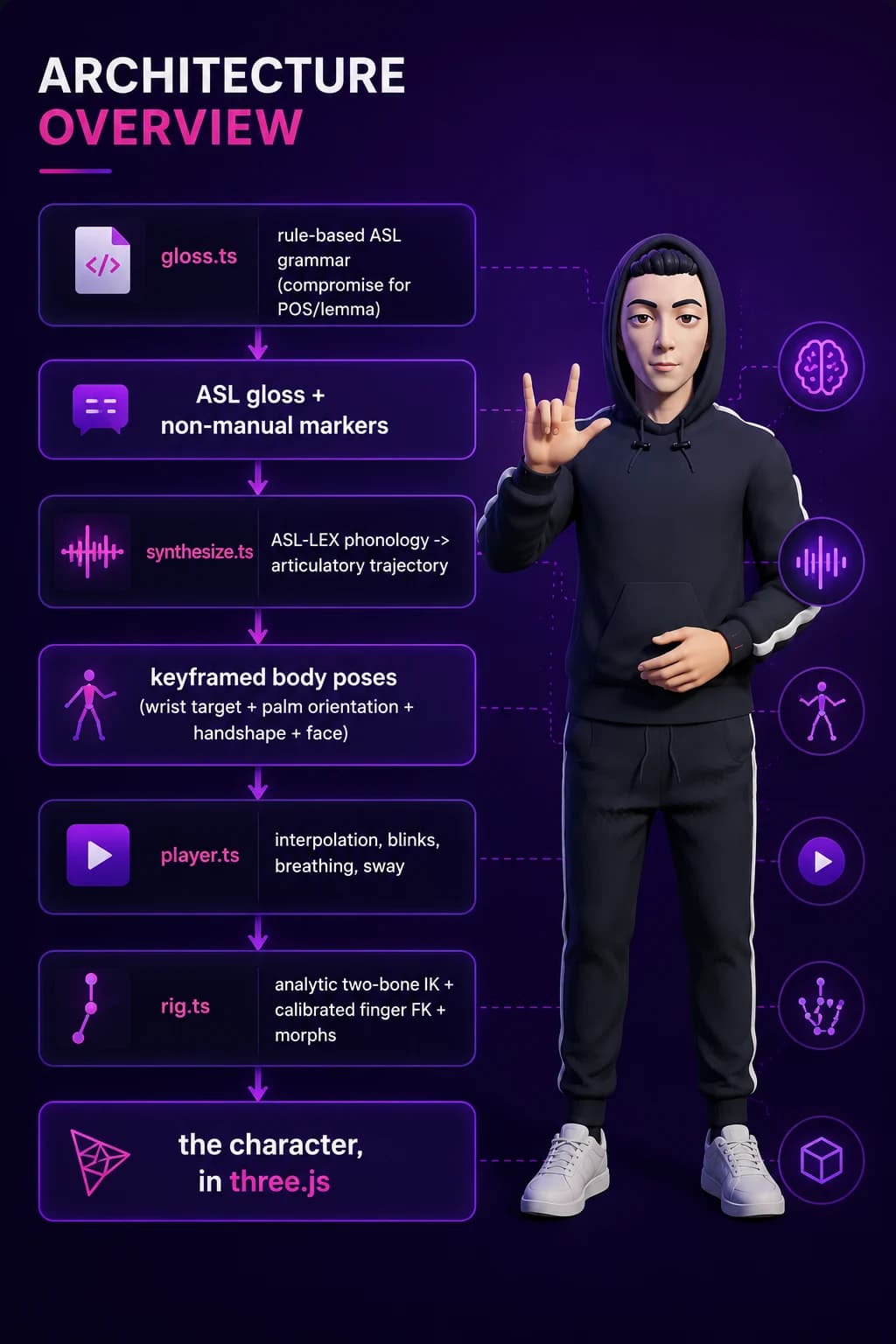
English text
   |  gloss.ts        rule-based ASL grammar (compromise for POS/lemma)
   v
ASL gloss + non-manual markers
   |  synthesize.ts   ASL-LEX phonology -> articulatory trajectory
   v
keyframed body poses  (wrist target + palm orientation + handshape + face)
   |  player.ts       interpolation, blinks, breathing, sway
   v
rig.ts               analytic two-bone IK + calibrated finger FK + morphs
   v
the character, in three.js
Each stage has one job and hands off a plain data structure. That matters more than it sounds. When a hand ended up in the wrong place, I needed to know which stage put it there. A monolith would have made every bug a whole-system bug.
The split also gives you cheap bisection. gloss.ts is testable without a renderer. synthesize.ts is testable without a rig. Both run headless in Node.
The layers, and where they live
Sign Character Project/
|-- my sign character.blend        the pre-existing character (never written to)
|-- data/
|   `-- asl-lex/signdata.csv       ASL-LEX 2.0 source data
|-- tools/
|   `-- build_lexicon.py           ASL-LEX CSV -> runtime JSON
|-- blender/
|   |-- facial_morphs.py           generates the 20 facial morphs
|   |-- body_profile.py            fits the collision volume to the mesh
|   |-- export_character.py        non-destructive GLB export
|   `-- preview_morphs.py          renders one face close-up per morph
`-- web/
    |-- app/                       Next.js app router
    |-- public/
    |   |-- character/             exported GLB + rig manifest
    |   `-- data/asl_lexicon.json  2,719 signs
    |-- src/asl/                   the animation system
    `-- test/run.ts                headless checks
Article 7 covers the folder layout and why it is shaped this way.
Where the signs come from
The key decision in the whole project: ASL-LEX 2.0 as the sign source.
ASL-LEX (Sevcikova Sehyr, Caselli, Cohen-Goldberg and Emmorey, 2021, CC BY-NC 4.0) is a lexical database of ASL signs annotated on roughly 22 phonological dimensions, with up to six sequential movement segments per sign.
Per segment it gives you: handshape and its feature decomposition, sign type (how the two hands relate), path movement shape, repetition, major and minor location, the location the movement ends at, and contact.
That is enough to reconstruct an articulatory trajectory. It is a description of the phonology of a sign, not a recording of one, which is exactly what a synthesiser needs.
tools/build_lexicon.py flattens the CSV into web/public/data/asl_lexicon.json: 2,719 signs, 6,414 indexed English words.
The mapping from ASL-LEX fields to the animation system:
handshape  -> finger flexion / spread / thumb   (handshapes.ts)
location   -> wrist target + orientation        (locations.ts)
movement   -> the path between the two          (synthesize.ts)
sign type  -> what the non-dominant hand does   (synthesize.ts)
The gap in the data, and how I handled it
ASL-LEX does not annotate palm orientation. It tells you where the hand goes and what shape it makes, not which way the palm faces.
Orientation matters enormously. The difference between a correct sign and a nonsense one is often a wrist rotation. So orientation comes from per-location defaults plus an explicit override table in overrides.ts for the signs where the default is wrong.
That is an honest limitation, not a clever solution. It means the long tail of 2,719 signs uses a reasonable default, and the signs I actually tested got hand-checked.
Blender: the export is where the traps are
The Blender side is three scripts, and the export one contains the single most expensive bug of the project.
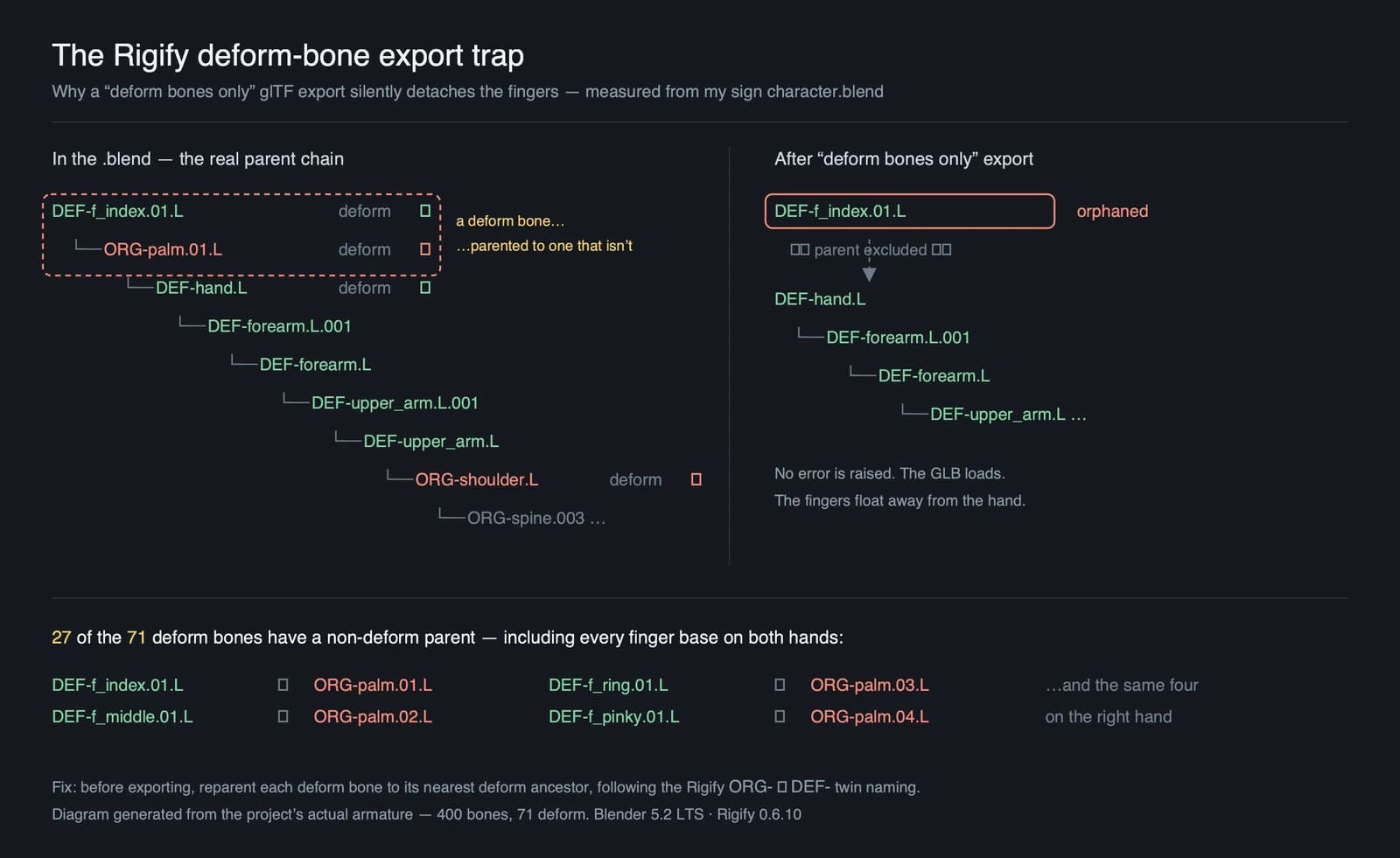
The DEF-bone trap
Rigify rigs parent their deform bones (DEF-) to control and mechanism bones (ORG-, MCH-). If you do a plain deform-bones-only glTF export, the parents of your deform bones are excluded, and the hierarchy silently breaks.
The symptom: fingers detach from the hand. No error, no warning. The GLB loads fine. The fingers just float.
The fix rebuilds a clean single-root deform hierarchy by walking up through the Rigify twins:
def nearest_def_parent(arm, name, defset):
    """Closest deform ancestor, following the Rigify ORG-/MCH- twins."""
    b = arm.bones[name].parent
    while b is not None:
        if b.name in defset and b.name != name:
            return b.name
        for pref in ("ORG-", "MCH-"):
            if b.name.startswith(pref):
                twin = "DEF-" + b.name[len(pref):]
                if twin in defset and twin != name:
                    return twin
        b = b.parent
return NoneThe export is also non-destructive. It works on duplicated, modifier-applied meshes in a temporary collection, exports, then purges. The source .blend is never written by the pipeline.
The facial morphs are generated, not sculpted
Since the character had no shape keys, blender/facial_morphs.py builds 20 of them procedurally from the face geometry, using radial falloff displacement fields anchored to measured anatomy:
EYE_L = Vector((0.269, -0.487, 10.098))   # +x is the character's left
EYE_R = Vector((-0.269, -0.487, 10.098))
EYE_RX, EYE_RZ = 0.134, 0.053             # eye opening half-extents
BROW_Z = 10.262
MOUTH = Vector((0.0, -0.629, 9.529))Next.js and three.js: what each is doing
The web layer is deliberately boring. Next.js 14 (app router), React 18, three.js 0.169, TypeScript 5.6.
"dependencies": {
  "@react-three/drei": "^9.114.0",
  "@react-three/fiber": "^8.17.10",
  "compromise": "^14.14.0",
  "next": "^14.2.15",
  "react": "^18.3.1",
  "react-dom": "^18.3.1",
  "three": "^0.169.0"
}
Next.js does routing, the dev server, and the production build. That is it. There is no API layer, no server-side rendering of the character, no database. The whole thing is a static page, the character and lexicon are static assets fetched by the browser.
That was a deliberate scope decision. The brief was explicit: no deployment config, no cloud services, no Docker, no CI. Everything runs locally.
three.js does the rendering and gives me the skeleton API. The character is loaded from GLB with GLTFLoader, and the animation system writes directly to bone quaternions and morph target influences each frame.
One important detail: the character component is loaded with ssr: false.
const SignStage = dynamic(() => import('@/components/SignStage'), { ssr: false });A coordinate-system trap worth knowing
Blender is Z-up. glTF is Y-up. The exporter converts, and the mapping is:
gltf.x =  blender.x
gltf.y =  blender.z
gltf.z = -blender.y
Every anchor, collision band, and measured constant crosses this boundary. Getting it wrong does not crash, it puts the hands somewhere plausible but wrong, which is much harder to notice.
The animation pipeline in more detail
Inverse kinematics: analytic, not iterative
Arms use a two-bone analytic IK solve with a pole vector for the elbow.
Why analytic instead of CCD or FABRIK: a two-bone chain has a closed-form solution. Iterative solvers are for chains where it does not. Analytic is exact, has no convergence behaviour to tune, and is deterministic. The same target always gives the same pose, which matters when you are bisecting a bug across frames.
The elbow position is chosen by swivel: rotating the elbow about the shoulder-to-wrist axis leaves the hand exactly where it is. That gives a free parameter to optimise. It is scored on both how far the arm penetrates the body and how strained the wrist is:
const score = (e: Vector3) => this.armPenetration(S, e, W) * 10 + wristStrain(e);Why both terms: optimising only for penetration gave anatomically valid arms in physically absurd wrist positions. The * 10 weights escaping the body above wrist comfort, because a hand inside the chest is a worse artifact than an awkward elbow.
Everything is measured from the rest pose, not hard-coded
This is the design decision I would most defend. The rig binding measures bend axes, palm normals, and segment lengths from the rest pose at load time:
interface DigitChain {
  bones: BoneRest[];
  /** curl axis expressed in each bone's own rest space */
  curlAxis: Vector3[];
  /**
   * How far each joint is already flexed in the bind pose.  The character is
   * modelled with relaxed, slightly curled fingers, so a flexion of 0 has to
   * straighten the finger rather than leave it alone.
   */
  restFlex: number[];
  /** spread axis (abduction) in the first bone's rest space */
  spreadAxis: Vector3;
  /** how far the digit is already abducted in the bind pose */
  restSpread: number;
}
Why: the character's bind pose has slightly curled, slightly splayed fingers, like a hand at rest, which is correct modelling. If you treat flexion 0 as do not rotate, every open handshape comes out half-closed.
restFlex records how bent each joint already is, so flexion 0 actively straightens.
The payoff: the code survives a re-export. Change the bone rolls or the proportions in Blender, re-export, and the solver recalibrates on load. Nothing to update by hand.
Interpolation: this is where the flickering lived
Keyframes are not uniformly spaced in time. A repeated sign puts four knots 0.145s apart between much longer transitions.
My first implementation used the uniform Catmull-Rom formula on those non-uniform knots, fed it the eased parameter, and disabled smoothing next to hold keyframes. Three bugs stacked.
The fix is time-aware cubic Hermite with Fritsch-Carlson monotone tangent limiting:
function hermite(
  p0: number, p1: number, p2: number, p3: number,
  dtPrev: number, dt: number, dtNext: number, s: number,
): number {
  // Secants either side of each knot.
  const d1 = (p1 - p0) / dtPrev;
  const d2 = (p2 - p1) / dt;
  const d3 = (p3 - p2) / dtNext;

  // Monotone (Fritsch-Carlson) tangents.  A plain finite difference overshoots
  // wherever the motion reverses, and a repeated sign reverses constantly,
  // SCHOOL claps down, up, down, up, so the hand would sail past the palm at
  // each extreme and come back.
  const limit = (a: number, b: number) => {
    if (a * b <= 0) return 0;                   // turning point: flat
    const m = (a + b) * 0.5;
    const cap = 3 * Math.min(Math.abs(a), Math.abs(b));
    return Math.sign(m) * Math.min(Math.abs(m), cap);
  };
  const m1 = limit(d1, d2);
  const m2 = limit(d2, d3);

  const s2 = s * s;
  const s3 = s2 * s;
  const h00 = 2 * s3 - 3 * s2 + 1;
  const h10 = s3 - 2 * s2 + s;
  const h01 = -2 * s3 + 3 * s2;
  const h11 = s3 - s2;
  return h00 * p1 + h10 * dt * m1 + h01 * p2 + h11 * dt * m2;
}
Why each piece:
Dividing by real dt values makes the tangents correct on non-uniform knots.
Evaluating on raw (un-eased) time stops velocity being shaped twice.
The limit function flattens the tangent at a direction reversal, so a clap decelerates into the palm instead of overshooting through it.
Prompt engineering: what actually worked
The prompts that moved this project forward had a specific shape. Four properties showed up in all of them.
1. State the constraint that is easy to violate
The Blender character already exists as "my sign character.blend".
First inspect and verify the character, rig, skeleton, bone hierarchy,
hand bones, facial rig, shape keys, and export compatibility.
Do not recreate or replace the character unless absolutely necessary.
Why this paragraph exists: regenerating the character is the path of least resistance whenever the rig is inconvenient. Without this sentence, that is what happens, and the whole premise of the project is lost.
What Claude understands from it: inspection is a required first step with its own deliverable, not a preamble to building.
Change one sentence and watch the behaviour change: drop Do not recreate or replace and you get a new character. Drop First inspect and verify and you get code written against assumed bone names that do not exist.
2. Bound the scope explicitly, including the negative space
Keep every file, model, dataset, script, asset, and generated output inside
the existing "Sign Character Project" folder. Work entirely on my local machine.
Do not configure deployment, cloud services, Docker, or CI/CD.
Why: build a production-quality system reads as an invitation to add a Dockerfile and a GitHub Actions workflow. Naming the things you do not want is more reliable than hoping they are not inferred.
3. Define done as an observable outcome
Continuously run, test, debug and verify until
"Hi, my name is Muhammad" produces a natural ASL performance.
Why: make it good is unfalsifiable. A named sentence that must work is a condition you can check, and it converts am I finished into a test.
4. Report the symptom, not your diagnosis
The most productive debugging prompt in the whole project was this one:
During "name" the left hand flips/twists into an incorrect orientation
before returning. Identify the root cause (bone rotation, quaternion
interpolation, Euler conversion, IK/FK switching, retargeting, constraints,
blending, or keyframes) and fix it permanently.
Why it works: it describes exactly what is visible, names the sign, names the moment, and then lists candidate causes without asserting one. That last part is the trick. Naming a suspected cause biases the search toward it.
In this case the answer was none of the obvious candidates. It was a swing-twist decomposition in the wrist limiter hitting its singularity. A prompt that had asserted it is the quaternion interpolation would have sent me down the wrong path.
Article 4 breaks down the full goal prompt. Article 8 documents every prompt used.
Loop engineering: measure, bisect, fix, verify
Single prompts got the system built. They did not get it correct. Correctness came from running a loop.
The loop I settled on:
+-------------------------------------------------+
| 1. MEASURE    run the detector over the corpus  |
| 2. BISECT     toggle subsystems to isolate      |
| 3. FIX        change one thing                  |
| 4. VERIFY     re-measure; keep only if better   |
+-------------------------------------------------+
                      ^                    |
                      |____________________|
The thing that made it work was building the measuring instrument first.
web/src/asl/diagnostics.ts detects 15 kinds of artifact: body penetration, hand collision, finger collision, hand flip, wrist over-bend, teleport, jitter, flicker, elbow locked or folded, fingertip driven through the palm, and morph flicker. It runs over a 48-sentence corpus at 30, 60 and 120 fps.
Debug toggles let me switch individual subsystems off and re-measure:
resolvers = { body: true, handHand: true, handLimb: true, swivel: true };Why this matters more than it sounds: with the detector in place, does this fix work stops being a matter of opinion. Several fixes that felt obviously right measured worse and got reverted:
Deadband on correction: flicker 209 to 362. Rejected.
Low-pass filter on carried offset: total 230 to 3286. Rejected.
Stateless solve-from-zero each frame: flicker 163 to 10, total 181 to 3365. Rejected.
Fixed-point convergence: flicker 141 to 151. Rejected.
Slowing both correction rates: head penetration 0 to 53. Rejected.
Every one of those is a plausible fix. Four of five made things worse. Without measurement I would have shipped one and believed it helped.
Those rejections are recorded as comments in the code, so nobody, including me, retries them.
Article 5 covers the loop in full, using the six-step structure.
One measurement lesson that cost me twice
I twice described a residual wobble as sub-millimetre, invisible based on model-space numbers. The character is about 11 units tall in model space, so those numbers meant nothing on their own.
Projecting the wrist through the actual camera told a different story: median 3.6 pixels, worst 17.4 pixels. Clearly visible.
Measure in the units the user perceives. For anything visual, that is screen pixels.
Where it ended up
Across a 48-sentence corpus (roughly 31,000 hand-frames), measured at 60fps:
Total artifacts: 4,062 unconstrained down to 118.
Zero events: handFlip, wristOverBend, teleport, jitter, fingerCollision, bodyPenetration, headPenetration, elbowLocked, elbowFolded.
Remaining: 110 flicker, 6 hand collision, 2 hand-in-forearm.
On the reference sentences, at 30, 60 and 120 fps:
I love you: Clean at all three rates.
Thank you: Clean at all three rates.
Nice to meet you: Clean at all three rates.
How are you?: Clean at all three rates.
Thank you very much: Clean at all three rates.
Hi, my name is Muhammad: 3 events at 60fps, 0 at 120fps.
The remaining events on Hi, my name is Muhammad are NAME's own repeated tap, a genuine direction reversal that the detector cannot distinguish from noise. Measured in screen pixels it is a maximum of 1.64px on a 1028x1706 canvas. Sub-pixel.
Key Takeaways
- 1
Runtime synthesis beats clip playback: when the input space is open-ended. A phrase list cannot fingerspell a name it has not seen.
- 2
A phonological database is the right abstraction: ASL-LEX describes signs as parameters, which is what a synthesiser can consume. Video is not.
- 3
Build the measuring instrument before the fix: Four of five plausible fixes in this project measured worse. Without a detector you cannot tell.
- 4
Measure in units the user perceives: Model-space distances told me a visible wobble was invisible. Screen pixels told the truth.
- 5
Calibrate from the rig, do not hard-code: Measuring bend axes and rest flexion at load time means the code survives a re-export.
- 6
Name the constraint you do not want violated: Do not recreate the character and no Docker or CI prevented entire categories of unwanted work.
- 7
Report symptoms, not diagnoses, when debugging with an AI agent: Asserting a cause biases the search. The NAME hand-flip was none of the obvious candidates.
- 8
Non-uniform keyframes need non-uniform interpolation: The uniform Catmull-Rom formula is wrong when your knots are not evenly spaced in time.
Resources
Character source: BlendSwap blend/30691 (https://blendswap.com/blend/30691). The base Rigify character used throughout this project, extended with the animation system and generated facial morphs described above.
ASL-LEX 2.0: Sevcikova Sehyr, Z., Caselli, N., Cohen-Goldberg, A. M., and Emmorey, K. (2021). The ASL-LEX 2.0 Project. Journal of Deaf Studies and Deaf Education, 26(2). Licensed CC BY-NC 4.0. Distributed via OSF.
Rigify: Blender's built-in rigging system. The DEF-, ORG-, and MCH- bone convention is documented in the Blender manual.
glTF 2.0 specification: Khronos Group. Relevant sections: skins, morph targets, coordinate system.
Fritsch, F. N., and Carlson, R. E. (1980): Monotone Piecewise Cubic Interpolation. SIAM Journal on Numerical Analysis, 17(2). The tangent-limiting scheme used in player.ts.
compromise: The NLP library used for part-of-speech tagging and lemmatisation in gloss.ts.
three.js: GLTFLoader, SkinnedMesh, morph target influences.
The rest of the series
This is Part 1 of a 10-part series. The remaining parts:
- 1
How Blender MCP Works with Claude Code
- 2
Building a Production Ready Sign Language Character
- 3
Designing the Goal Prompt
- 4
Loop Engineering Explained
- 5
Building Natural ASL Animation
- 6
Project Folder Architecture
- 7
Every Prompt Used During Development
- 8
Common Problems We Solved
- 9
Lessons Learned
Frequently Asked Questions
Is the animation pre-recorded or generated?
Generated. Every frame is synthesised at runtime from ASL-LEX phonological data. There are no animation clips in the project and no baked actions in the .blend file. Any English sentence produces a performance, including sentences with words that have no lexical sign.
What happens when a word has no ASL sign?
It gets fingerspelled. Proper nouns are always fingerspelled regardless of whether a sign exists. That is correct ASL behaviour for names. fingerspell.ts handles the letter sequence and its timing.
Why ASL-LEX instead of a motion-capture dataset?
Motion capture gives you recordings of specific signs by specific signers. ASL-LEX gives you a parametric description of the sign itself, handshape, location, movement, contact, which is what you need to synthesise one. Mocap would also have constrained me to whatever vocabulary happened to be recorded.
Do I need a GPU or a cloud service to run this?
No. It runs in a browser on integrated graphics. There is no inference at runtime. The AI in this project was in the development process, not the deployed system. The shipped code is deterministic procedural animation.
How accurate is the ASL?
Geometrically clean and phonologically grounded, but not validated by a Deaf signer. The grammar layer handles topic-comment order, time-first, copula dropping, wh-movement, and non-manual markers. The phonology comes from a peer-reviewed database. Palm orientation is the weakest link because ASL-LEX does not annotate it. Treat it as an engineering demonstration, not a translation tool.
Can I use a different character?
Yes, and that is the point of calibrating from the rest pose. The solver measures bend axes, palm normals and segment lengths at load time. A different rig with three-phalanx finger chains and a deform hierarchy should work after re-running the export. The facial morphs would need their anatomy constants re-measured.
Why Next.js if there is no backend?
Mostly for the build pipeline and dev server. The app is a single static page. Next.js is arguably more than this needs, and Vite would have been a defensible choice. It was already familiar, and the build config cost nothing.
What was the hardest bug?
A collision-correction limit cycle. The release logic decayed corrections toward zero while the resolvers pushed toward the constraint surface. Two targets that never coincide, so the hand crossed the surface on alternate frames indefinitely. It showed up as a clean period-2 sawtooth in one axis with the other two perfectly smooth. Article 9 covers it.
If you are building AI-powered systems that need to ship as real products, from three.js visualisation through prompt engineering to headless test harnesses, that is exactly the kind of AI product engineering we ship at ETechViral. The rest of this series will go deeper into each layer, starting with how Blender MCP integrates with Claude Code.
- AI
- ASL
- Accessibility
- Three.js
- Blender
- Claude Code
- Procedural Animation
- Inverse Kinematics
- Next.js
Related articles

Self-Hosting n8n in Production: A Real-World Setup Guide (nginx, PM2, Node, and the Bugs Nobody Warns You About)
A step-by-step, battle-tested guide to self-hosting n8n on your own server with nginx, PM2, and the correct Node version, plus fixes for the localhost webhook URL bug, npm install stalls, and password resets without SMTP.
15 min read
AI and WebRTC: The Future of Communication
WebRTC and AI are starting to work together, and the result is a new era of communication that's faster, clearer, and more personal. A look at how the two technologies combine, what they unlock for businesses and consumers, and where they're headed next.
5 min read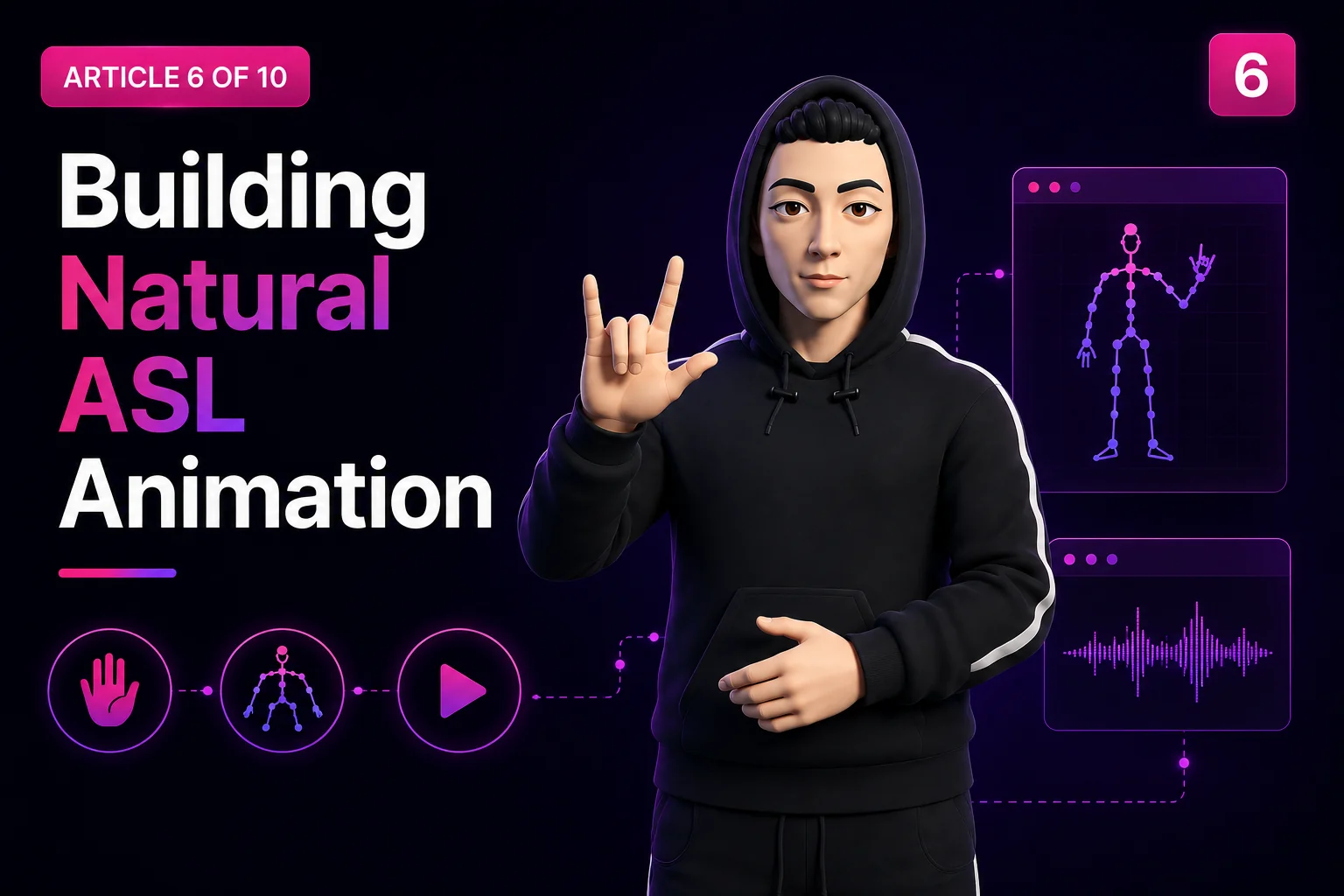
Building Natural ASL Animation
How English text becomes an ASL performance: parsing, grammar reordering, phonological synthesis, fingerspelling, non-manual markers, gaze, interpolation and the cleanup passes that keep hands out of the chest.
18 min read