Designing the Goal Prompt
A clause-by-clause breakdown of the goal prompt that drove a real ASL animation project: what each sentence does, what breaks when you remove it, and how to write goal prompts that hold an agent to an outcome instead of a task.
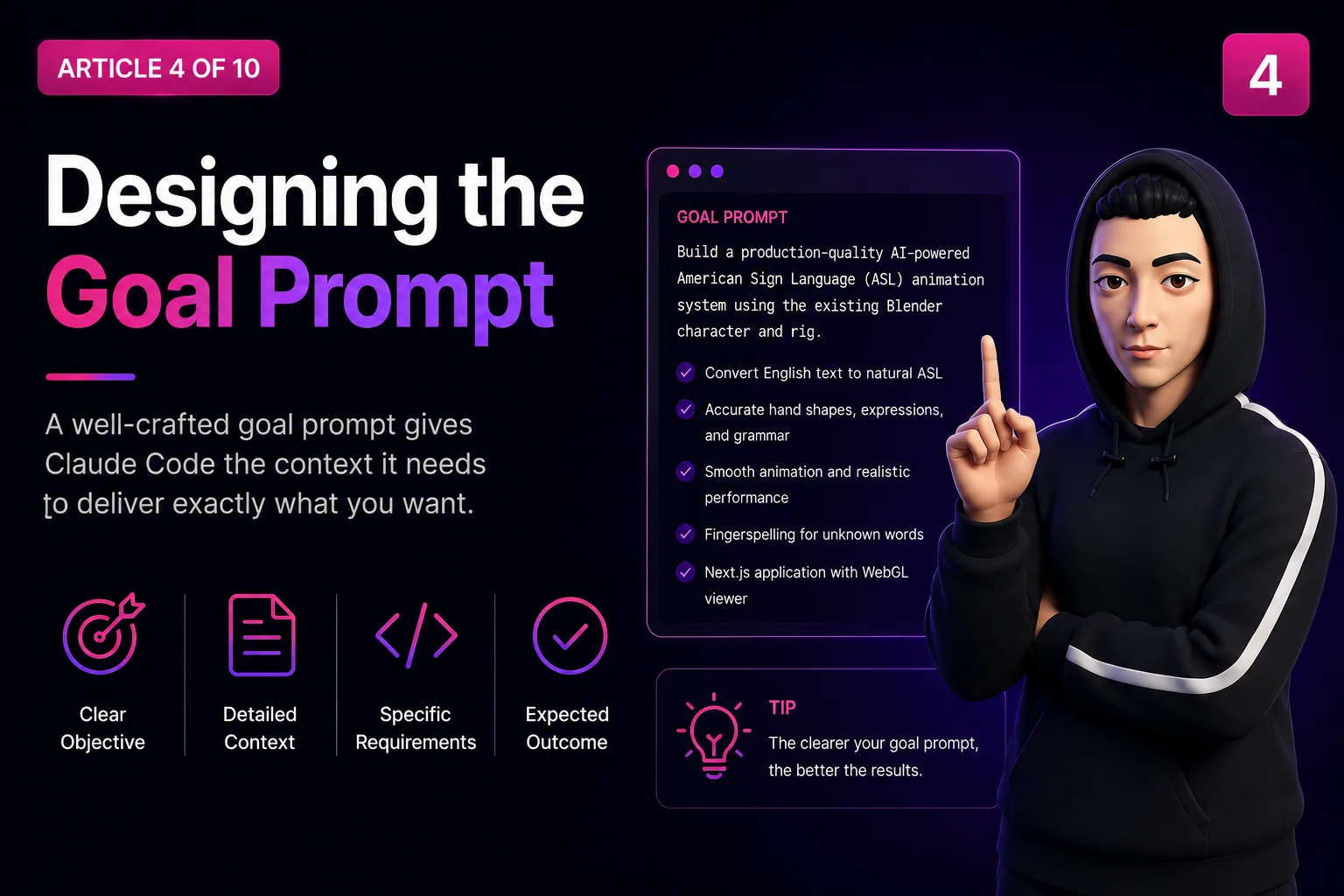
There is a difference between telling an agent what to do and telling it what must be true when it stops.
The first gets you code. The second gets you a working system, because the agent keeps going when the code does not work.
This article breaks down the actual goal prompt that drove the ASL Sign Character project, clause by clause, with what each one prevented. Every prompt shown here is the real text that was used.
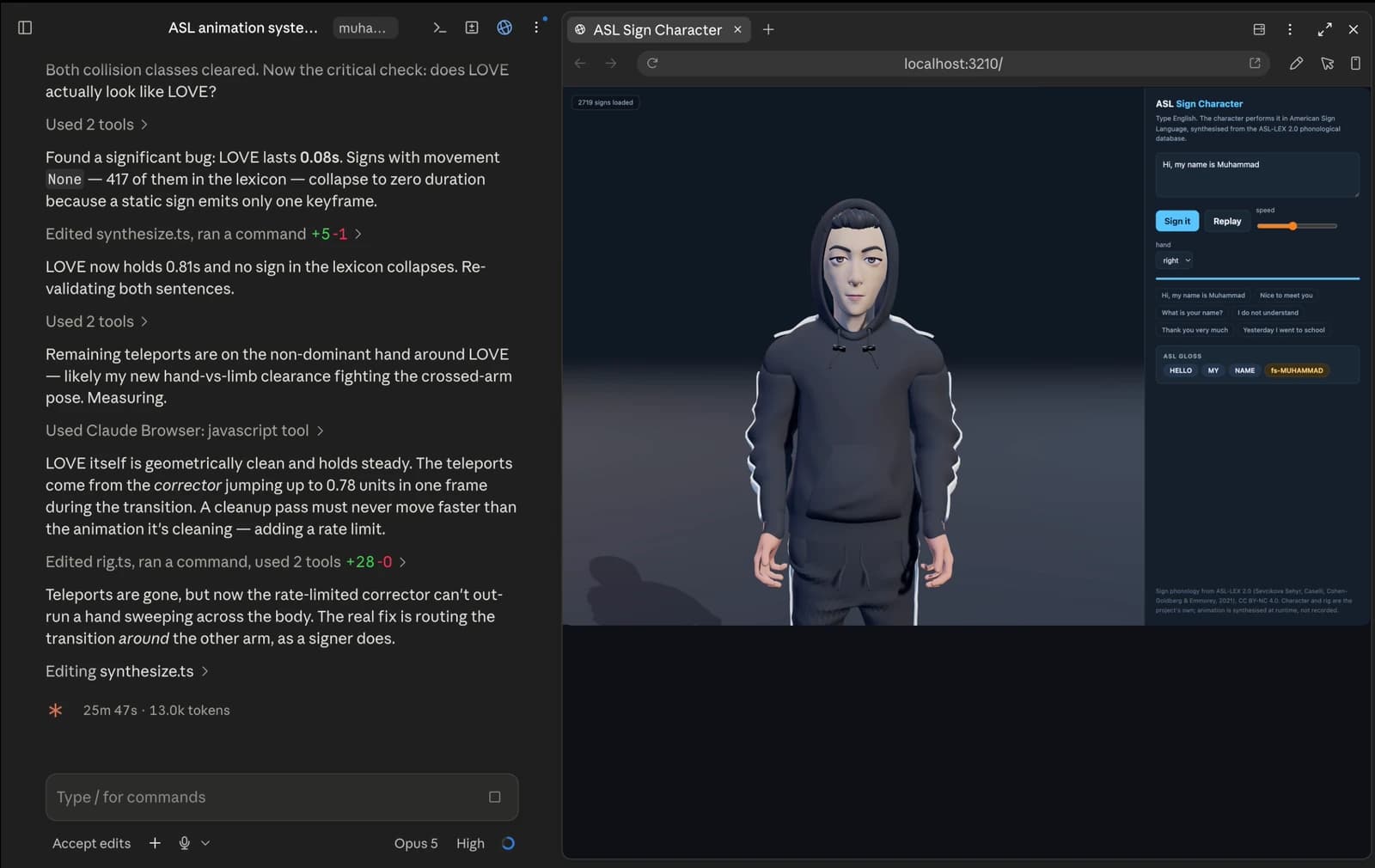
Task prompts vs goal prompts
A task prompt describes work:
Build an ASL animation system for my Blender character.Claude will do that. It will write a plausible amount of code, tell you it is done, and stop. Whether the character actually signs anything is not something that prompt asked about.
A goal prompt describes a state of the world:
Continuously run, test, debug and verify until "Hi, my name is Muhammad"
produces a natural ASL performance.
Now done is a condition that can be checked. The agent cannot declare victory by writing files.
The mechanical difference: in Claude Code, /goal installs a session-scoped stop hook. When the agent tries to end its turn, the hook evaluates the condition. If it does not hold, the agent is told to keep working. It clears itself once satisfied.
That inverts the default. Normally an agent stops when it thinks it is finished. With a goal, it stops when the goal says so.
When to use which:
Task prompt: The work is small and you will check it. You want a specific change. You will iterate conversationally.
Goal prompt: The work spans many steps and you are away. You want an outcome, however it is reached. You want the agent to iterate on its own.
The real goal prompt
Here it is in full, as it was actually sent:
Build a production-quality AI-powered ASL animation system in
Desktop/Sign Character Project. The Blender character already exists as
"my sign character.blend" and Blender is already open.

First inspect and verify the character, rig, skeleton, bone hierarchy,
hand bones, facial rig, shape keys, and export compatibility. Do not
recreate or replace the character unless absolutely necessary. Only the
animation system is missing.

Research best open-source ASL datasets, Hugging Face models, MediaPipe
pipelines, motion generation approaches, then implement the highest-quality
solution.

Convert English to natural ASL with proper grammar, accurate handshapes,
finger articulation, facial expressions, eye gaze, head movement, body
posture, smooth blending, and fingerspelling for unknown words.

Build the Next.js app around this existing character, keeping every file,
model, dataset, script, asset, and generated output inside the existing
"Sign Character Project" folder. Work entirely on my local machine.

Continuously run/test/debug/verify until "Hi, my name is Muhammad" produces
a natural ASL performance.

Do not configure deployment, cloud services, Docker, or CI/CD.
Roughly 900 characters. Every paragraph is load-bearing. Let us go through them.
Clause 1: the outcome and where it lives
Build a production-quality AI-powered ASL animation system in
Desktop/Sign Character Project. The Blender character already exists as
"my sign character.blend" and Blender is already open.What I would change: production-quality is the weakest phrase in the prompt. It is doing rhetorical work, not engineering work. It sounds like a standard but does not name one. The last clause is what actually defines quality. If I rewrote this, I would cut it.
Clause 2: inspect first, and do not replace
First inspect and verify the character, rig, skeleton, bone hierarchy,
hand bones, facial rig, shape keys, and export compatibility. Do not
recreate or replace the character unless absolutely necessary. Only the
animation system is missing.
This is the most important paragraph in the prompt, and it is three separate instructions.
First inspect and verify
Why: the failure mode this prevents is writing code against an imagined skeleton. Bone names are not guessable. DEF-f_index.01.L is a convention, not a law, and code written against index_01_L fails silently at runtime with an undefined lookup.
What it produced: the inspection turned up things that changed the design.
400 bones, 71 deform.
Zero shape keys across all 147 meshes, so the facial rig had to be built, not driven.
Zero actions, so nothing was pre-animated.
DEF-f_index.01.L parented to ORG-palm.01.L, a non-deform bone.
That last one is why export_character.py exists at all. A naive export detaches every finger. The inspection clause found it before it cost a day of debugging phantom geometry.
Do not recreate or replace the character
Why: this is the escape hatch clause. When a rig does not do what an agent wants, generating a new one is the path of least resistance. It looks like progress, and it destroys the premise of the project.
What Claude understands: the character is a fixed input, not a variable.
Change one sentence: delete it, and the most likely outcome is a generated humanoid with clean bone names and no relationship to the character you own.
Why unless absolutely necessary is in there: it is an escape valve with a high bar. Absolute prohibitions invite either malicious compliance or getting stuck. This phrasing says: if you genuinely cannot proceed, say so, but the burden is on you.
For what it is worth, it was never invoked. The .blend was never written by the pipeline.
Only the animation system is missing
Why: scope. It tells the agent where the gap is so it does not spend effort auditing things that are fine.
Clause 3: research before implementing
Research best open-source ASL datasets, Hugging Face models, MediaPipe
pipelines, motion generation approaches, then implement the
highest-quality solution.
Why it exists: to prevent the agent reaching for the first plausible approach.
What Claude understands: survey the space, then choose, with the choice being defensible against the alternatives.
What it actually produced: the decision to use ASL-LEX 2.0, a phonological database, rather than any of the named technologies.
That is the interesting part. The prompt named MediaPipe and Hugging Face models, and the research concluded that neither was right:
MediaPipe: Does hand tracking. It reads poses from video. This project needs to generate poses. Wrong direction.
Motion generation models: Produce plausible human motion, not linguistically correct ASL. Fluency in ASL is phonological precision, not naturalistic movement.
ASL-LEX: Describes 2,723 signs as parameters (handshape, location, movement, contact) which is exactly what a synthesiser can consume.
The lesson for prompt design: naming candidate technologies is useful as a starting set, not a constraint. Research X, Y, Z, then implement the highest-quality solution leaves room to reject all of X, Y and Z. If it had said implement using MediaPipe, the project would have been built on a tool pointed the wrong way.
Change one sentence: Use MediaPipe to generate the animation produces a worse system with more work.
Clause 4: the requirements list
Convert English to natural ASL with proper grammar, accurate handshapes,
finger articulation, facial expressions, eye gaze, head movement, body
posture, smooth blending, and fingerspelling for unknown words.
Why it exists: each item is a subsystem that is easy to skip, and skipping any of them still produces something that superficially works.
An agent optimising for a demo builds hands. Hands moving with a frozen face reads as a robot. Facial non-manual markers are not decoration in ASL, since raised brows mark a yes/no question and furrowed brows mark a wh-question. Leave them out and you have dropped grammar.
Trace each item to what it built:
proper grammar: gloss.ts. Topic-comment, time-first, copula dropping, wh-movement.
accurate handshapes: handshapes.ts. Every ASL-LEX handshape label authored.
finger articulation: Calibrated finger FK in rig.ts, three phalanges per digit.
facial expressions: 20 generated morphs plus the non-manual layer.
eye gaze: face.ts. Gaze, saccades, blinks.
head movement: Head and torso channels on every pose.
smooth blending: The interpolation system in player.ts.
fingerspelling: fingerspell.ts.
Why enumeration beats a summary: make it look natural is unfalsifiable. A list of nine subsystems is a checklist, and each one is independently checkable.
Change one sentence: drop fingerspelling for unknown words and the system fails on names, which is exactly what the test sentence needs.
Clause 5: containment
Build the Next.js app around this existing character, keeping every file,
model, dataset, script, asset, and generated output inside the existing
"Sign Character Project" folder. Work entirely on my local machine.
Why it exists: agents scatter. Left alone, they write to temp directories, home-directory caches, global package locations, and wherever a downloaded dataset defaults to.
Why the enumeration: keep files in the folder is ambiguous about generated output. Naming model, dataset, script, asset, and generated output closes the gaps, since the downloaded ASL-LEX CSV, the exported GLB, and the built lexicon JSON all land inside the project.
What it produced: a genuinely portable directory. data/asl-lex/ holds the source CSV, web/public/character/ holds the export, web/public/data/ holds the built lexicon. Copy the folder, and everything comes with it.
Work entirely on my local machine does double duty: no uploading the character anywhere, and no runtime that depends on a service.
Clause 6: the done condition
Continuously run/test/debug/verify until "Hi, my name is Muhammad"
produces a natural ASL performance.
This is the clause that makes it a goal prompt rather than a task prompt.
Why a specific sentence: it is checkable. Make it work well is not a condition; this sentence performs correctly is something you can run.
Why that sentence: it is chosen to exercise the whole pipeline in one line.
Hi: A lexical sign (HELLO), with warm affect on the face.
my: A possessive pronoun, which is a body-anchored sign.
name: A two-handed sign with contact between the hands.
is: The copula, which ASL drops; the grammar layer must delete it.
Muhammad: A proper noun with no lexical sign, so it must be fingerspelled.
One sentence covers lexical lookup, grammar transformation, two-handed contact, and fingerspelling. If it works, most of the system works.
This is a test case, and choosing it is a testing skill. The same instinct that picks a good unit test picks a good done-condition: maximum coverage, minimum setup.
Why the verbs are enumerated (run, test, debug, verify) is that make it work does not imply running anything. Naming the loop makes execution part of the job rather than an optional check.
Change one sentence: replace with until it works and the agent decides what working means, which will be the code compiles.
Clause 7: negative scope
Do not configure deployment, cloud services, Docker, or CI/CD.Why it exists: production-quality reads as an invitation to add a Dockerfile, a GitHub Actions workflow, and a deploy target. That is a plausible interpretation and it is hours of unwanted work.
Why naming them individually works better than keep it simple: vague constraints get interpreted generously. Specific prohibitions do not.
What Claude understands: these are out of scope regardless of how appropriate they would normally be.
The general principle: name the negative space. Most disappointment with agents comes from work you did not want but never said you did not want. The cost of a do not list is one sentence; the cost of not having one is a cleanup pass.
How to write your own
The structure that worked, generalised:
- 1
OUTCOME: What you want to exist, and where.
- 2
PRECONDITION: What to inspect before deciding anything.
- 3
PROHIBITION: What must not be changed or replaced.
- 4
APPROACH: What to research; leave room to reject it.
- 5
REQUIREMENTS: Enumerated subsystems, not a summary.
- 6
CONTAINMENT: Where files may go; what environment.
- 7
DONE: A specific, checkable condition.
- 8
NEGATIVE: What not to build.
Not every project needs all eight. Most need 1, 5, 7 and 8 at minimum: outcome, requirements, done condition, negative scope.
Testing a goal prompt before you run it
Three checks, and they catch most problems:
Anti-patterns
Make it production-ready: Names no standard. Instead: name a checkable condition.
Use the best approach: No basis for comparison. Instead: Research X, Y, Z, then choose.
Do not break anything: Unbounded. Instead: name what must keep working.
Listing every detail inline: Hits length limits, unmaintainable. Instead: point at a spec file.
Naming the fix in a bug report: Biases the search. Instead: describe symptoms only.
That last one is worth its own note. The most productive debugging prompt in this project described exactly what was visible and then listed candidate causes without asserting one:
During "name" the left hand flips/twists into an incorrect orientation
before returning. Identify the root cause (bone rotation, quaternion
interpolation, Euler conversion, IK/FK switching, retargeting, constraints,
blending, or keyframes) and fix it permanently.
The actual cause was none of the obvious candidates, a swing-twist decomposition in the wrist limiter hitting a singularity. A prompt asserting it is the quaternion interpolation would have sent the search the wrong way.
Key Takeaways
- 1
A goal prompt states a condition, not a task: In Claude Code, /goal installs a stop hook, so the agent cannot finish by writing files.
- 2
Pick a done-condition the way you would pick a test case: Hi, my name is Muhammad covers lexical lookup, grammar transformation, two-handed contact and fingerspelling in one line.
- 3
Enumerate; do not summarise: Nine named subsystems is a checklist. Make it natural is unfalsifiable.
- 4
Name the negative space: Do not configure deployment, Docker, or CI/CD costs one sentence and saves hours.
- 5
Prohibit the easy escape hatch: Do not recreate the character is the clause that kept the project honest.
- 6
Name candidate technologies as a starting set, not a constraint: The research clause named MediaPipe and Hugging Face; the right answer was a phonological database.
- 7
Report symptoms, not diagnoses: Asserting a cause biases the search.
Resources
Claude Code documentation: docs.claude.com/en/docs/claude-code (https://docs.claude.com/en/docs/claude-code) for slash commands, hooks and session configuration.
Claude Code hooks: The mechanism behind session-scoped goals.
ASL-LEX 2.0: Sevcikova Sehyr, Caselli, Cohen-Goldberg and Emmorey (2021), CC BY-NC 4.0. The database the research clause led to.
The rest of the series
This is Part 4 of a 10-part series. The other parts:
- 1
How I Built an AI-Powered ASL Sign Character with Claude Code
- 2
How Blender MCP Works with Claude Code
- 3
Building a Production Ready Sign Language Character
- 4
Loop Engineering Explained
- 5
Building Natural ASL Animation
- 6
Project Folder Architecture
- 7
Every Prompt Used During Development
- 8
Common Problems We Solved
- 9
Lessons Learned
Frequently Asked Questions
What is a goal prompt in Claude Code?
A prompt set with /goal that installs a session-scoped stop hook. Before the agent can end a turn, the hook checks whether the stated condition holds; if it does not, the agent keeps working. It clears automatically once satisfied. The effect is that the agent stops when the goal says so rather than when it believes it is finished.
How is a goal prompt different from a normal prompt?
A normal prompt describes work and the agent stops when it considers the work done. A goal prompt describes a state of the world and the agent cannot stop until that state holds. Use normal prompts for changes you will review immediately; use goals for multi-step work you want driven to an outcome.
What makes a good done condition?
The same properties as a good test case: specific, checkable, and high coverage per unit of setup. Hi, my name is Muhammad was chosen because it exercises lexical lookup, ASL grammar (the copula must be dropped), a two-handed contact sign, and fingerspelling of a proper noun, in five words.
Should I tell the agent which technology to use?
Name candidates as a starting set, not a mandate. This project's prompt named MediaPipe and Hugging Face models; research concluded both were wrong. MediaPipe reads poses from video and this project needed to generate them. Phrasing it as research X, Y, Z, then implement the highest-quality solution left room to reject all three.
Why include do not instructions?
Because most unwanted work comes from plausible interpretations you never excluded. Production-quality reasonably implies deployment configuration. One sentence, Do not configure deployment, cloud services, Docker, or CI/CD, removes that entire category.
How do I stop the agent from fixing the wrong thing?
Two clauses. Give it an explicit workflow (Test to Observe to Identify Root Cause to Fix to Retest to Verify) and add do not apply fixes until you understand exactly why the issue occurs. In this project that turned a proposed weight tweak into the discovery of two genuine defects in the morph generator.
Can I change the goal partway through?
Yes, and that is the strongest argument for the file-pointer pattern. If the goal references a spec file, you edit the file rather than restating the goal. The condition stays stable while the requirements evolve.
If you are shipping software with AI agents in the loop (real production work, not demos) writing goal prompts like these is a core skill. That is exactly the kind of AI product engineering we ship at ETechViral. The next part of the series covers the loop engineering pattern that runs inside the goal.
- Prompt Engineering
- Claude Code
- AI Agents
- Goal Prompt
- Software Engineering
- LLM
Related articles
Building a Production Ready Sign Language Character
What a 3D character actually needs to sign ASL: finger topology, deform hierarchy, facial openings, shape keys, and how to export a 400-bone Rigify rig to a web-sized GLB without breaking the hands.
15 min read
How Blender MCP Works with Claude Code
Connecting Claude Code to a live Blender session over MCP: how to inspect bones, shape keys, materials and animations in a real Rigify character, with the actual queries, outputs, failure modes and debugging techniques.
16 min read
How I Built an AI-Powered ASL Sign Character with Claude Code
A real engineering breakdown of a 3D character that signs any English sentence in ASL, synthesised at runtime from the ASL-LEX 2.0 phonological database, driven by analytic IK in three.js, with no pre-recorded animation.
22 min read